Credible websites

Data & statistics

Dissertations & theses

Documentaries and films

Electronic books

News & magazines

Reference sources

Scholarly and peer-reviewed journals

Sound recordings & music

Subscription databases

While Google and Wikipedia can be good starting points for general background information on a topic, they should never be your only sources for academic research. Unlike random websites, library materials are reviewed by experts, so you can be confident you’re using accurate and reliable sources of information.
Most academic libraries provide access to hundreds (at larger schools, thousands) of electronic research databases and millions of other resources. If you’re new to college-level research, knowing which databases to use is nearly impossible without guidance.
Research guides are one of the best ways to identify different types of resources in your subject area. Here are some of the resources you can find using a research guide.
Credible websites
Data & statistics
Dissertations & theses
Documentaries and films
Electronic books
News & magazines
Reference sources
Scholarly and peer-reviewed journals
Sound recordings & music
Subscription databases
Most large academic libraries provide access to thousands, and in some cases millions, of electronic books. However, older, specialized, or less frequently used titles may exist only in print.
In order to locate print books, researchers must know where and how to look for specific books on particular topics on library shelves. In the library world, this is known as shelf reading.

Shelf reading is a browsing technique in which researchers locate a relevant book and then explore the books shelved nearby. Academic libraries organize books by subject, so books on similar topics are generally shelved together. Browsing the shelves around a book you have already found can help you discover additional materials on the same or related topics, including useful books you might not find through a catalog search.
Understanding the basics of the Library of Congress Classification System will help you locate books on the shelves and browse subject areas more effectively.
You may already be familiar with the Dewey Decimal System used by most public and school libraries to catalog and organize books on the shelves. The Library of Congress Classification (LCC) system is used by most academic and research libraries in the United States to organize books and other materials by subject. Developed by the Library of Congress beginning in the late 19th century,
In the Library of Congress Classification system, books are arranged by call number in alphanumeric order. Call numbers are the codes academic libraries use to organize and locate books and other materials on their shelves. LCC divides knowledge into 21 broad subject areas identified by letters and numbers, and can be thought of as the “address” of a book in the library.
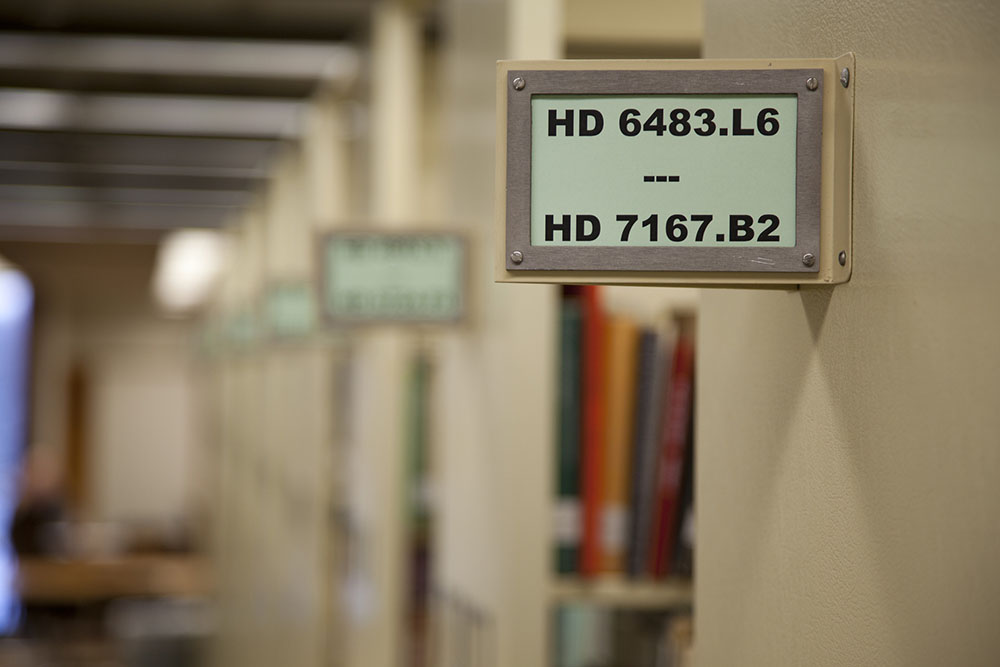
Call numbers also group books by subject, which means that books on similar topics are shelved near one another. For example, the image above shows a shelf with call numbers ranging from HD 6483.L6 to HD 7167.B2. Books in this section fall within the broader subject area of Industries, Land Use, and Labor.
A: General Works
B: Philosophy, Psychology, and Religion
C: Auxiliary Sciences of History
D: World History
E: History of the Americas
F: History of the Americas
G: Geography, Anthropology and Recreation
H: Social Sciences
J: Political Science
K: Law
L: Education
M: Music & Books on Music
N: Fine Arts
P: Language & Literature
Q: Science
R: Medicine
S: Agriculture
T: Technology
U: Military Science
V: Naval Science
Z: Bibliography, Library Science, and Information Resources (General)
The following books about the political theorist Niccolò Machiavelli are shelved in the same general location. Let’s break down the call number of one of the books: Machiavelli’s Virtue by Harvey C. Mansfield, JC143.M4 M355 1996
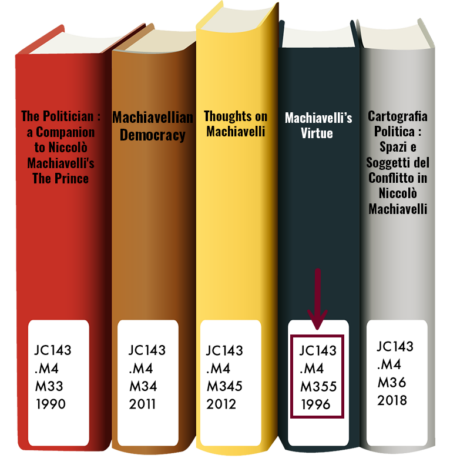
| Segment | Code | Meaning |
|---|---|---|
| Class | J | Political Science (Main Subject) |
| Subclass | JC | Political Theory |
| Topic | 143 | Works about Niccolò Machiavelli |
Cutter 1* | .M4 | For the subject (Machiavelli) |
| Cutter 2 | M355 | For the author (Mansfield) |
| Date | 1996 | Year of publication |
*A cutter number is a coded shorthand for a word (usually a name) that allows libraries to arrange books alphabetically on the shelf without spelling out the full name.
You don’t need to decode every piece of a call number to locate a book. What does matter is knowing just enough to find and browse books effectively on a library shelf.
The quickest way of locating research guides from your library is to go to Google and type the following:
Use AND to search for all the search terms you specify and quotation marks (“…”) around phrases.
Many large universities have multiple libraries (law, medicine, art, etc.) So, you may need to specify the name of the library. The following video shows an example of searching for research guides on the main page of the New York University Libraries.
Subject librarians work in specific academic areas, like psychology, history, or economics. They help choose and purchase books, journals, and databases that support those subjects. They also create helpful research guides with lists of the best resources for your topic.
While subject librarians can show you the best tools and databases to use, help you develop search strategies, and point you to relevant materials, they won’t read the books or articles for you or tell you exactly which ones to cite. That part is up to you, because you’re the one developing the argument and interpreting the information.

Students often contact their academic libraries to request that they purchase print textbooks for their courses. However, academic libraries generally do not purchase textbooks for individual students. Library collections are designed to support the broader teaching and research needs of the university, while students are normally responsible for obtaining the required textbooks for their courses. Thus, it is policy for many or most academic libraries not to purchase textbooks.
At some schools, instructors may ask the library to order a copy (or several copies) of required textbooks to be placed on course reserve, allowing many students in a class to share access to them for short loan periods. If for some reason you are unable to purchase a textbook, ask the course instructor to request that the library purchase and place a print copy on course reserve.
Electronic textbooks can be especially difficult for libraries to purchase. Many textbook publishers do not offer institutional licenses to libraries. If they do, the cost can be substantially higher than the price charged to an individual student. Some licenses also restrict the number of people who can use an ebook at the same time.